
Access Control and Security:
You Decide Who Sees What
You decide who sees what, and who can do what.
The Business Assistant™ protects your company data at sign-in and inside every part of the system.
Multi-factor sign-in
Use an authenticator app or a code sent by email. You set it up when you sign up, and an administrator can require any user to set it up at their next login or reset it. Trusted devices can be reviewed and forgotten.
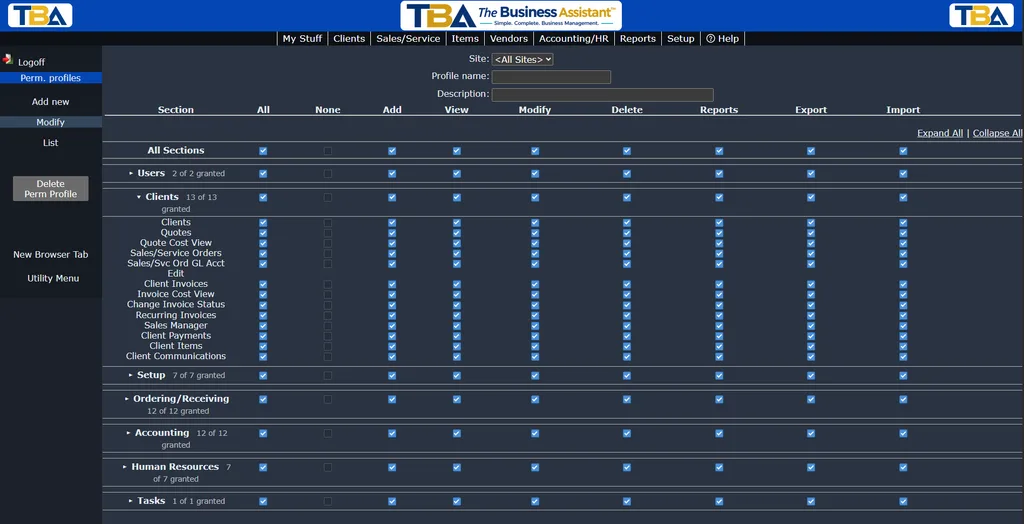
Permission profiles
Set exactly what each user can see and do, area by area, including costs and profit on quotes and invoices, payroll, accounting and setup.
More ways to stay in control
- Multiple sites. On the Multi-site plan, report on one location or all of them, and give users access to specific sites.
- Email log. Every email the system sends is recorded, with its recipients, subject and delivery status.
- Your time zone. Dates and times display in your company’s time zone.
- Site-level access. On multi-site plans, users can be limited to specific locations.
- Adviser access. The company that signed you up, or your accountant, can sign in to help only if you let them. Choose Off, View only, Standard or Administrator, and your subscription and payment setup stay off limits unless you say otherwise.
- Company isolation. Each company’s records are kept in a separate database.
- Audit trail. Every email the system sends is logged with recipients, subject and delivery status, and we record who accepted your license agreement, when, and from what address.
Protecting data in transit and at the edge
- All traffic to the Service uses HTTPS (TLS). Plain HTTP requests are redirected to HTTPS.
- Traffic passes through a service that provides denial-of-service protection and a web application firewall, and which verifies our servers’ certificates on every connection.
- Our servers are monitored around the clock, and we are alerted to major failures.
Payments
Card payments are handled by Stripe. Card numbers go to Stripe and are not stored in The Business Assistant, so your database never holds them.
Availability and backups
- Redundant servers. Production runs on multiple servers in a secure data center, with every database transaction replicated to a second server, and a further replica kept at a separate location.
- Failover. If a server fails its health check, traffic is moved to a healthy server.
- Backups with point-in-time recovery. Full and incremental backups are taken continuously with transaction-log archiving, so data can be restored to a specific moment.
- Protected offsite copies. A backup copy is kept offsite in storage that is locked against deletion, so that a compromised credential or ransomware cannot erase it.
How we build and run the Service
- We review the code for security problems and fix what we find, including hardening of session handling, input limits and password storage.
- Access to production systems is limited to the staff who need it, and administrative sign-in requires multi-factor.
- The sign-up form is protected against automated abuse.
What we ask of you
- Give each person their own login and the narrowest permissions that let them do their job.
- Remove users promptly when they leave, and keep multi-factor turned on.
- Use strong, unique passwords and keep your devices up to date.
- Review the access you have given advisers from time to time.
Reporting a security problem
If you think you have found a vulnerability, or suspect your account has been misused, write to [email protected] with what you saw and how to reproduce it. Please give us a reasonable time to fix it before you tell anyone else, and do not access other customers’ data or disrupt the Service while you investigate. We will acknowledge your report and keep you informed. See also our Acceptable Use Policy.
If a security incident affects your data, we will notify the company’s administrators without unreasonable delay and as the law requires.
Secure by design
Start now and pay half price for your first 3 months.