
An overtime rule says when regular hours become overtime or double time. Setup > Company > Overtime Rules lists your rules; each rule is a card you can edit.
A rule’s settings #
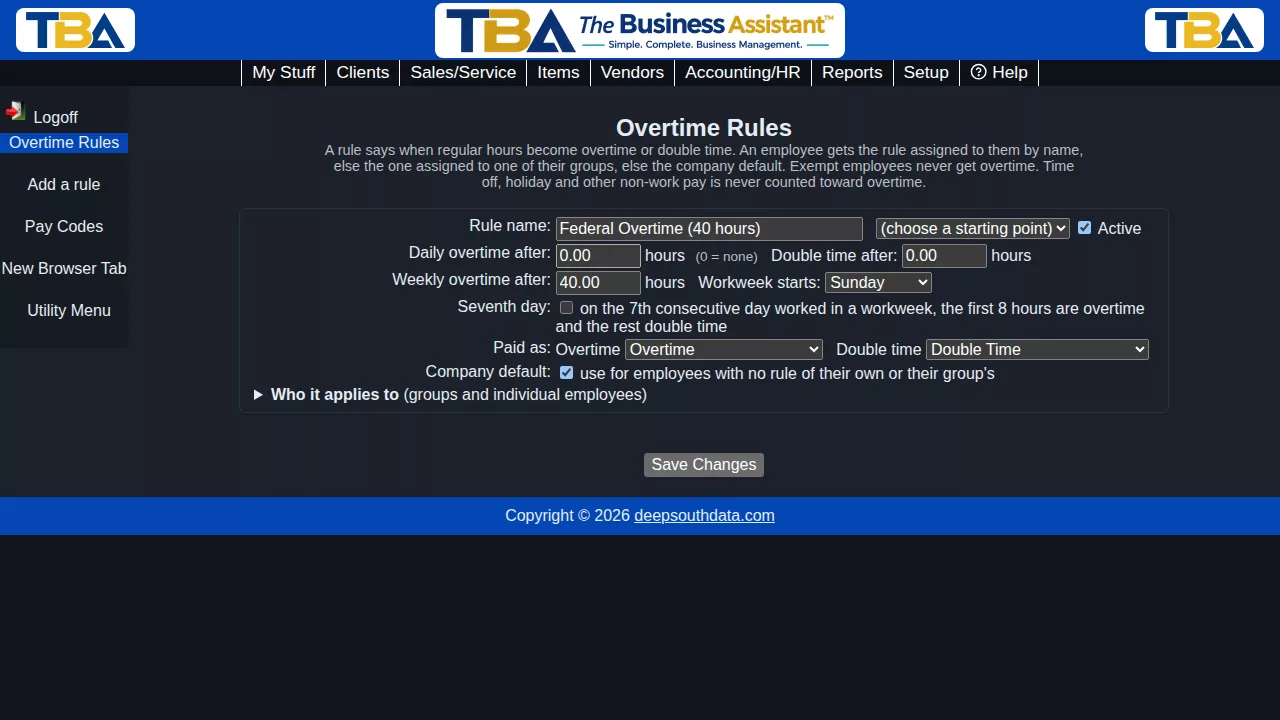
- Rule name and Active.
- Starting point – pick Federal (FLSA), California, Alaska, Colorado, Nevada or No overtime to fill in the numbers below. These are only starting points; overtime law changes, so check your state’s current rules and adjust.
- Daily overtime after – hours in a day after which the rest are overtime. 0 means no daily overtime.
- Double time after – hours in a day after which the rest are double time. 0 means none.
- Weekly overtime after – hours in a workweek after which the rest are overtime (40 for the federal rule).
- Workweek starts – the day your workweek begins.
- Seventh day – on the 7th consecutive day worked in a workweek, the first 8 hours are overtime and anything beyond is double time (as in California).
- Paid as – the pay codes used for overtime and double time. Left alone, the first Overtime and Double Time codes are used.
- Company default – use this rule for every employee who has no rule of their own or via a group. Only one rule can be the default.
- Who it applies to – check groups and/or individual employees.
Which rule an employee gets #
- A rule assigned to the employee by name;
- otherwise a rule assigned to one of their groups;
- otherwise the company default rule;
- otherwise no overtime.
Employees marked Exempt from overtime on their Payroll tab never get overtime.
What counts #
- Only Regular hours count toward the thresholds and convert. Leave, holiday, premium and other pay is never counted as time worked for overtime.
- Daily thresholds apply first; the weekly threshold then applies to the regular hours that remain, so no hour is counted twice.
- A workweek that straddles two pay periods is evaluated as a whole week, so a weekly threshold is not reset by a pay period boundary.
- If a day mixes work types, the overtime hours are taken from the last work type recorded that day.
Seeing the result #
Tick Apply overtime rules on the Hours by Work Type report to see regular and overtime hours. Pay runs always apply the rules.


