
A pay code is a kind of pay: Regular, Overtime, Salary, Vacation, Sick, Commission, Bonus, and so on. Every hour of time and every amount on a pay run carries a pay code. Setup > Company > Pay Codes is where you define them.
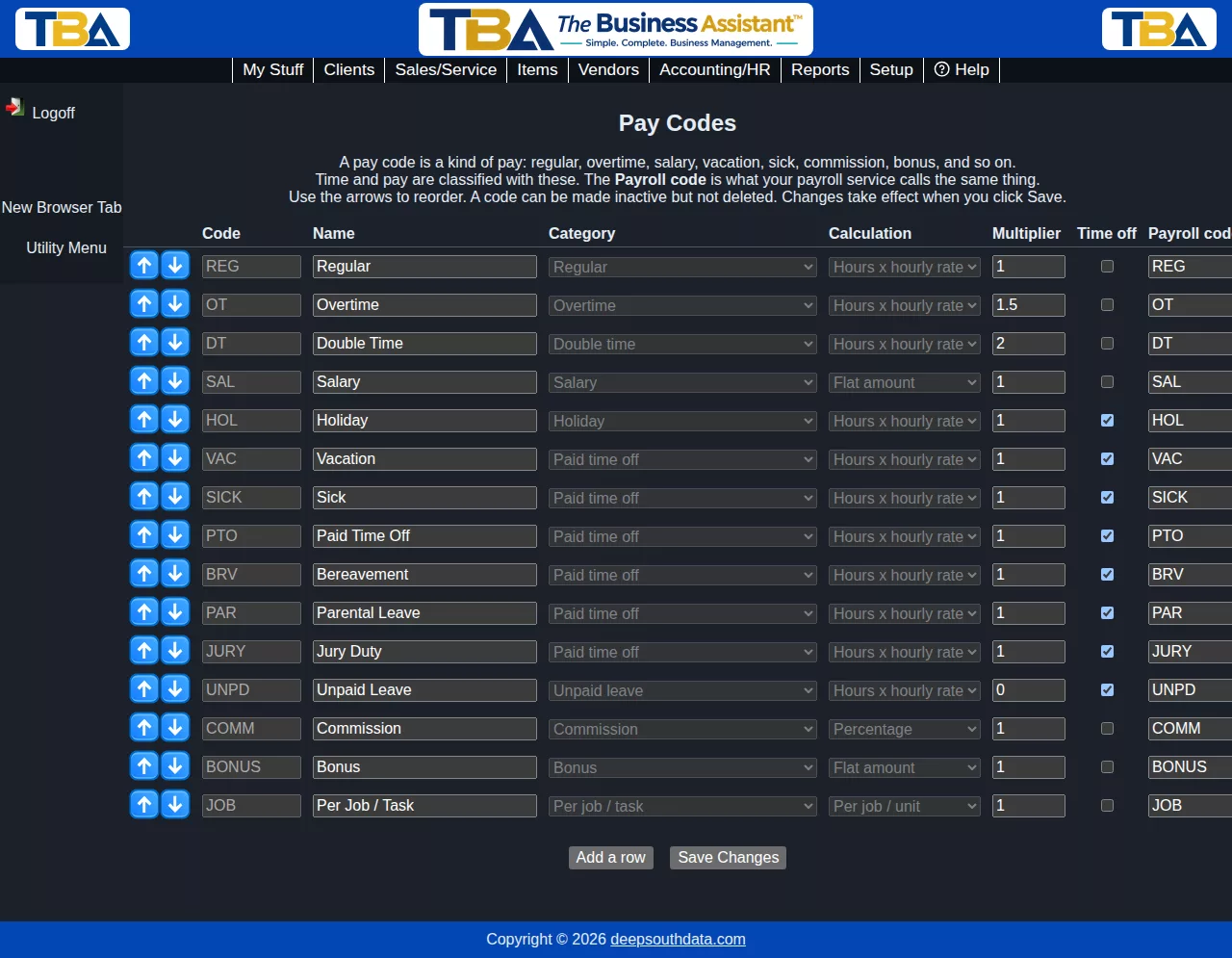
The first time anyone opens the page, TBA fills in the usual set for you: Regular, Overtime, Double Time, Salary, Holiday, Vacation, Sick, Paid Time Off, Bereavement, Parental Leave, Jury Duty, Unpaid Leave, Commission, Bonus and Per Job / Task.
The grid #
Each row is one pay code. Use the arrows to change the order; the order is used wherever pay codes are listed. Click Add a row for a new code and Save Changes when you are done.
- Code – a short unique code (up to 20 characters), such as REG. Codes that came with TBA can’t be renamed.
- Name – what people see.
- Category – Regular, Overtime, Double time, Salary, Holiday, Paid time off, Unpaid leave, Commission, Bonus, Per job / task, Premium (differential, on-call, travel) or Reimbursement (not wages). The category tells TBA how to treat the code: only Regular hours can become overtime, and Salary is the code used for a salaried employee’s pay line.
- Calculation – Hours x hourly rate, Flat amount, Percentage, or Per job / unit. Hourly codes are priced from the employee’s rate; the others are for amounts you enter on a pay run.
- Multiplier – applies to hourly codes. 1 pays the normal rate, 1.5 time and a half, 2 double, 0 not at all (unpaid leave).
- Time off – check this for codes that represent time not worked (vacation, sick, holiday, and so on). Leave types are built on these (see Leave Types and Policies).
- Payroll code – the code your payroll service uses for the same kind of pay. It appears in pay run exports.
- Active – uncheck to stop offering the code. A pay code can be made inactive but never deleted, because past time and pay runs refer to it.
Where pay codes are used #
- Manual time entries (Time Tracking Calendar) – choose Regular, or a leave code such as Vacation.
- Overtime Rules – what converted hours are paid as.
- Employees’ pay rates – a rate can be set for a specific pay code (Personnel).
- Pay Runs and the Hours by Work Type report.
You need payroll view permission to see this page and payroll modify permission to change it.


