
The Labor Cost by Work Type report shows what labor cost over a period: the hours, the wages, and the employer costs on top of them (labor burden and benefits), grouped by work type. Add wages and employer costs and you get the loaded cost; divide by hours and you get the loaded cost per hour, the number to compare against what you charge.
Find it under Reports > HR Reports > Labor Cost. You need the same permission as the Hours by Work Type report.
Running it #
- Choose From and Through dates.
- Tick Include draft pay runs if you also want runs that have not been approved yet.
- Click Run Report.
Where the numbers come from #
The report reads your pay runs, not the timesheets directly, so it matches what you actually paid.
- Which runs: a run counts when its pay period ends within your dates and it has been approved (or later).
- Wages: every earnings line except reimbursements.
- Employer costs: each person’s employer-cost lines are split across the work types they worked, in proportion to their wages in each. The totals always agree with the pay runs.
- Not tied to a work type: salary, commission and holiday pay have no work type, so they appear on their own row.
Who is behind a number #
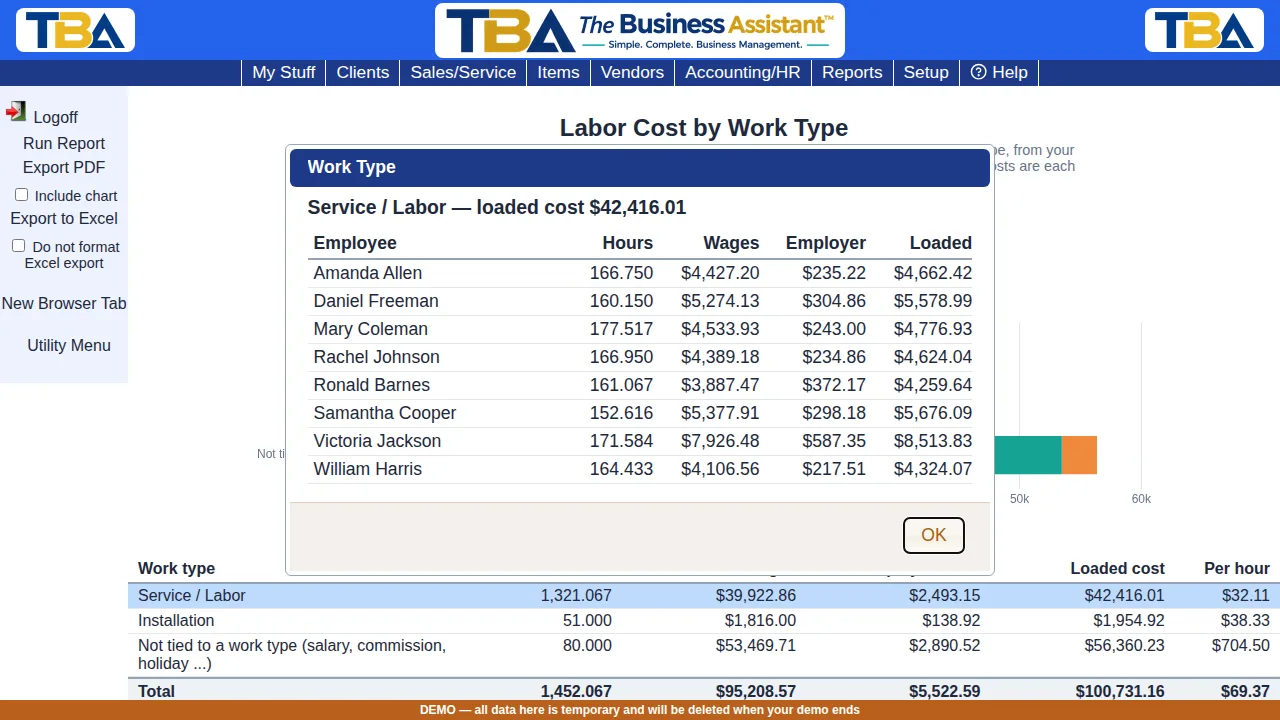
Click any work type to see each employee’s hours, wages, employer cost and loaded cost for it. There is no waiting; the detail arrives with the report.
Printing and exporting #
Export PDF (tick Include chart to add the wages and employer cost bars) and Export to Excel work like the other reports. The Excel file has one row per employee and work type.


