
Timesheet Approval lets a manager confirm each person’s hours for a pay period before payroll is run. If someone’s hours change after you approve them, the approval is flagged so nothing slips through unnoticed.
Find it under Accounting/HR > Timesheet Approval.
Who can approve #
- Payroll administrators (those with permission to modify personnel payroll) can approve anyone.
- Managers can approve their direct reports: the people whose Manager is set to them on the employee’s Payroll tab. A manager also needs permission to view personnel time.
- Anyone else sees a message that approving isn’t available to them.
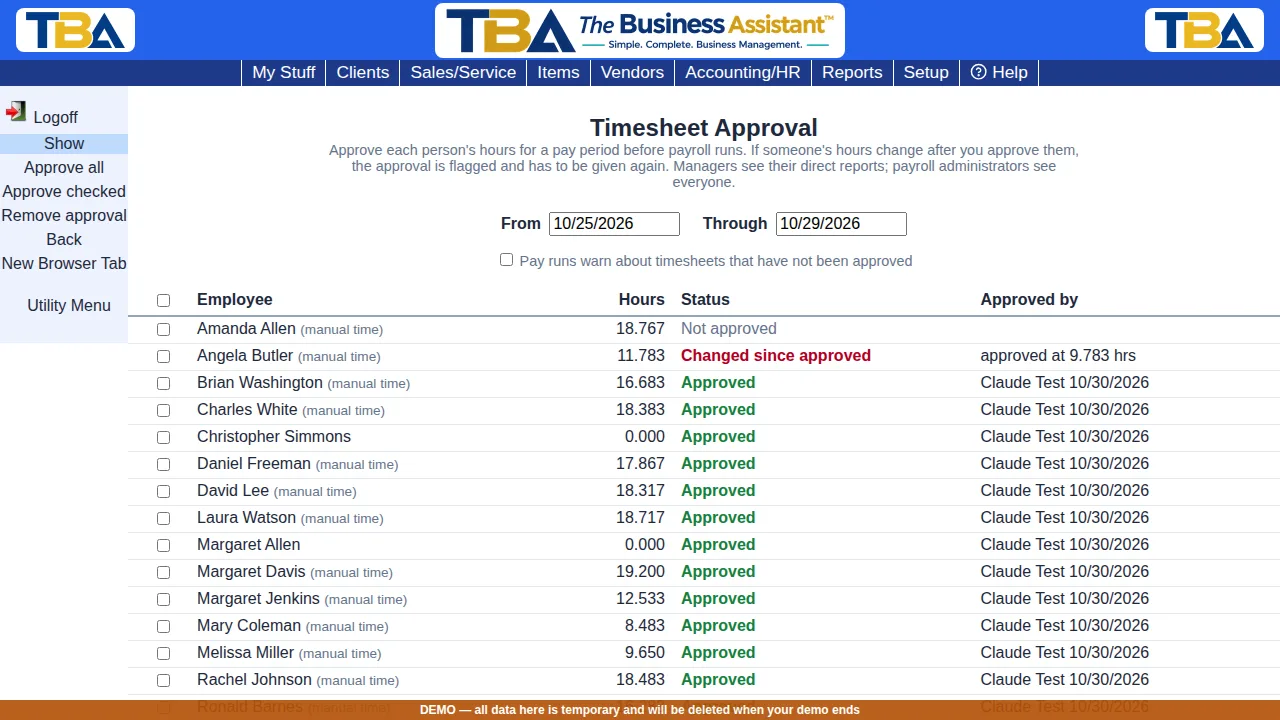
Approving #
- The page opens on the period of your most recent pay run. Change From and Through and click Show to look at another period. Approvals belong to an exact period, so use the same dates as the pay run.
- Each person is listed with their hours for the period. These are the same reconciled hours payroll uses (the Timesheet Report). People whose list shows (manual time) have hours that clock punches don’t cover, so they are worth a look first.
- Click Approve all to approve everyone who is not yet approved, or check some people and click Approve checked.
An approved row shows who approved it and when.
When hours change #
Each approval remembers the hours that were approved. If the hours are different later (a time entry was added, corrected or removed) the row reads Changed since approved in red, with the hours that were approved. Approve it again to accept the new hours.
Removing an approval #
Check the people and click Remove approval. Once a pay run covering the period has been approved, approvals for that period can no longer be removed, so the record stays true to what was paid.
Pay runs #
Payroll administrators see a checkbox, Pay runs warn about timesheets that have not been approved. When it is on, a pay run’s list of things to check includes a line for each person with hours whose timesheet is not approved, or whose hours changed after approval. These are warnings only: they never stop you from approving a pay run.


